Quick Answer & Technician Key Takeaways
- Replacing just the worn part on your Meta / Oculus Meta Quest 3 saves 50% to 80% compared to buying a replacement headset.
- Skip abrasive lens pastes, liquid controller sprays, and tensioned charging cords that often cause deeper board or optical damage.
- Ship from any of the 50 US states for $0 using our prepaid FedEx Ground label at /fix/meta/quest-3/power-ports.
- Every repair starts with a free bench checkup and exact quote, backed by a 90-day warranty and free return shipping if you decline.
Direct Technician Summary: Meta Quest 3 Broken or Loose Charging / Cable Port
In most Meta / Oculus Meta Quest 3 units we inspect, broken or loose charging / cable port is caused by one worn physical part rather than permanent mainboard failure. Skip liquid sprays, abrasive lens pastes, and tensioned cords, run the 10-minute checks below, or print a free FedEx Ground shipping label for a free bench checkup and 90-day repair warranty at RockIT Repairs.
When your Meta / Oculus Meta Quest 3 runs into Broken or Loose Charging / Cable Port, your virtual reality setup can go from an everyday favorite to gathering dust on a shelf. A single worn or damaged part should never force you to spend hundreds of dollars replacing the entire headset.
If the cord wiggles, won't charge, got melted, or keeps disconnecting, we replace the damaged plug port inside your Meta Quest 3 so you don't have to buy a new headset. At VRHeadset.Repair (powered by RockIT Repairs in Fredericksburg, Virginia), Co-Founders James Einhorn and Jonathan Hawkins and our technicians have helped over 25,000 customers across all 50 states fix just the part that broke. Below, we cover early warning signs, internal hardware mechanics, safe 10-minute home checks, risky internet hacks to skip, and how our free mail-in checkup works.
1. Early & Advanced Symptoms on Your Meta Quest 3
Hardware wear on the Meta / Oculus Meta Quest 3 usually gives off clear warning signs weeks before failing completely. Catching these symptoms early protects your main board and optical assembly:
- Intermittent Dropouts After Warming Up: The issue starts appearing 15 to 30 minutes into active room-scale movement or when a plug or button is touched at a slight angle.
- Reboots Only Help Briefly: Restarting or factory-resetting your Meta Quest 3 makes zero lasting difference because the underlying cause is physical wear rather than firmware corruption.
- Visible Scuffs, Loose Play, or Calibration Drift: Under bright light or inside the built-in test menu, you can see physical wear, drift, optical haze, or blinking indicator LEDs.
2. Why Broken or Loose Charging / Cable Port Develops on VR Hardware
Unlike stationary electronics, VR headsets and controllers absorb constant motion, cable pull, workout moisture, and optical exposure. Official hardware care documentation from USB Implementers Forum highlights how compact head-mounted displays pack sensitive optics, high-current USB-C power circuits, and miniature sensors millimeters apart:
- Sideways Strain on Ports and Tether Cords: Stepping on a cable or playing while plugged in without strap strain-relief pulls sideways against fine solder pads inside the socket.
- Thumbstick Sensor & Trigger Friction: Thousands of sprint clicks and fast swings wear microscopic grooves into potentiometer wipers and return springs.
- Optical Coating & Sunlight Sensitivity: Eyeglass frames rubbing against pancake or Fresnel lenses leave central scuff marks, while direct sunlight focuses intense heat onto the inner display.
- Heat Cycling & Dust Buildup: Active VR fitness sessions draw warm air and lint into cooling channels, straining fans and battery cells over time.
Inside the Fredericksburg Bench: How We Diagnose Meta Quest 3 Broken or Loose Charging / Cable Port
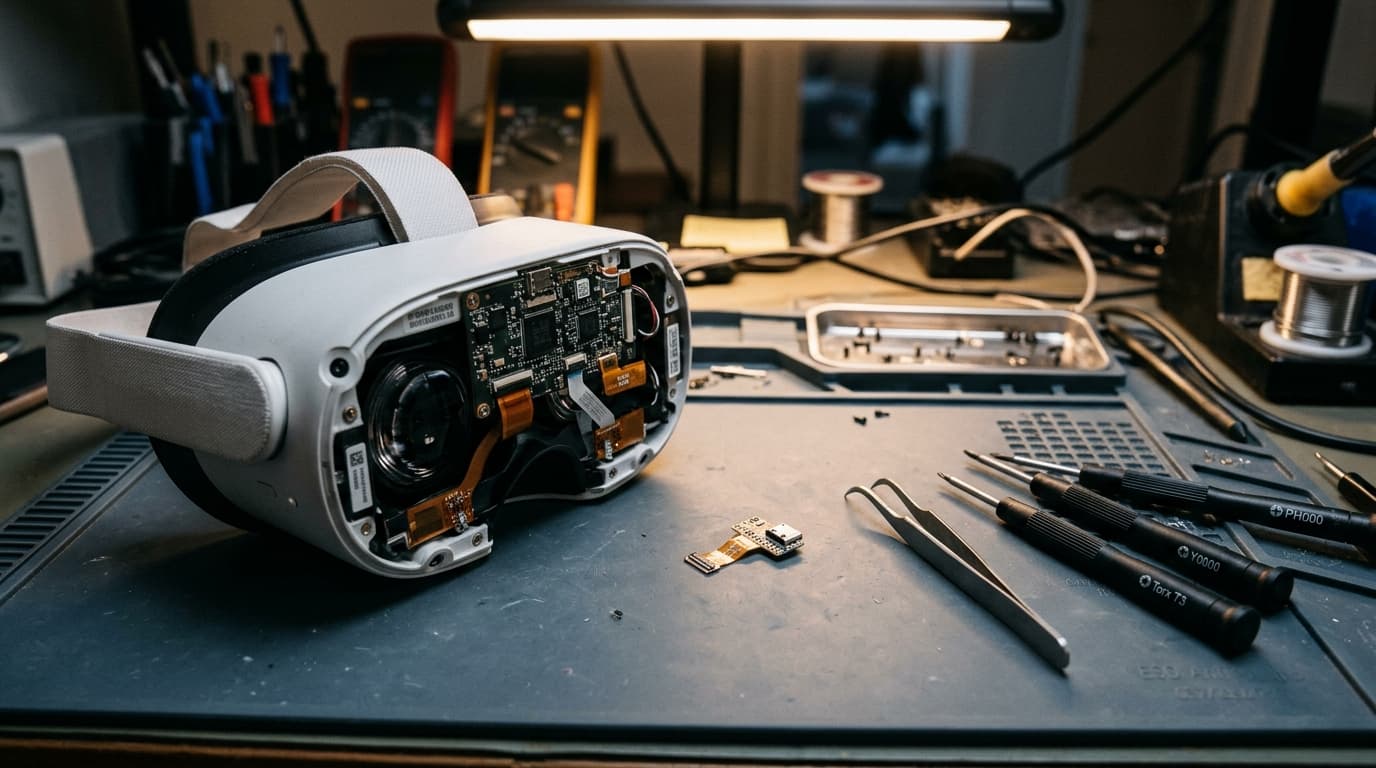
Inside the Meta / Oculus Meta Quest 3, the USB-C power assembly handles sustained charging current alongside high-speed data lines spaced fractions of a millimeter apart. When a heavy braided link cable pulls downward during active room-scale play, mechanical leverage transfers directly onto the surface-mount anchor pads and fine inner contact pins. Even microscopic pin deflection increases electrical contact resistance, turning normal charging wattage into localized heat right at the port tongue.
On our Fredericksburg, Virginia micro-soldering bench, technicians inspect the port under stereo magnification, check upstream power-management chips for thermal stress, and install a reinforced replacement port assembly before load-testing charging current and data stability. Addressing a loose or warm socket early prevents trace delamination and protects your internal lithium-ion battery pack under our 90-day parts and labor warranty.
Every mail-in package arriving via our free FedEx Ground shipping label is logged into a private tracking ticket with technician notes. If you ever have questions before shipping, you can message our Fredericksburg, Virginia technicians directly for straight answers with zero pressure.
Meta Quest 3 Broken or Loose Charging / Cable Port: Symptom vs. Hardware Cause Matrix
Use this quick technician reference table to compare what you see at home with what is happening inside your Meta / Oculus Meta Quest 3:
| Symptom You Notice | What Is Happening Inside | Safe At-Home Check | Permanent Bench Fix |
|---|---|---|---|
| Charging LED blinks or only charges when cord is held at an angle | Fatigued USB-C center tongue pins or cracked solder joints on the port sub-board | Test a known-good USB-C brick and cable on a flat table with zero cord tension | Micro-soldered port replacement and current load test (Free FedEx Label) |
| Port feels hot to the touch or smells warm within minutes of plugging in | High-resistance pin arcing or conductive debris bridging power and ground pins | Unplug immediately, stop charging, and inspect under flashlight without metal tools | Full charging rail inspection, port assembly swap, and thermal bench verification |
| Headset drains fast or refuses to wake after sitting on the charger | Degraded lithium-ion cell capacity or tripped charging protection circuit | Perform a gentle 15-second power button reset after 30 minutes on an official charger | Precision battery or power IC service backed by our 90-day warranty |
Free Inbound FedEx Label / Free In-Shop Checkup
Need Your Meta Quest 3 Repaired by a Specialist?
Print a free FedEx Ground shipping label in 60 seconds, ship your Meta Quest 3 to our Fredericksburg, Virginia bench, and get a free hands-on checkup and exact quote before any paid work starts.
Get Free FedEx Label3. Safe 10-Minute At-Home Checks Before Shipping
Try these gentle, tool-free checks at home to rule out external accessories before printing your shipping label:
- Remove Snap-On Covers & Magnetic Adapters: Test your Meta Quest 3 without aftermarket shells, extension cables, or magnetic USB tips that trap metal debris or block airflow.
- Inspect Gently Under a Bright Flashlight: Look closely for packed lint, bent contact pins, or surface scuffs. Never poke metal paperclips or needles into a port, and only wipe VR lenses with a clean, dry optical microfiber cloth.
- Test Status Lights & Calibration Menus: Check built-in controller calibration dots or charging LEDs without rubber-banding or forcing cables at an angle.
4. Three Risky Internet DIY Tricks to Avoid
Every week our technicians rescue headsets where a viral five-minute hack accidentally caused deeper damage. Skip these three common mistakes:
- Abrasive Pastes or Alcohol on VR Lenses: Toothpaste, lens polishes on coated pancake optics, or rubbing alcohol strips anti-reflective coatings permanently and leaves cloudy smears across your field of view.
- Flooding Controllers with Liquid Spray: Spraying household lubricants into a drifting thumbstick flushes conductive residue onto capacitive touch ribbons underneath.
- Propping Loose Charging Cables Under Tension: Holding a wiggling USB-C plug tight with a rubber band causes micro-arcing heat that can char the main charging board.
5. Complete Meta / Oculus Meta Quest 3 Repair Options
While your device is at our shop for Broken or Loose Charging / Cable Port, we inspect your entire headset at no extra charge under one free FedEx Ground shipping label and browse all brands on our complete VR repair directory:
- Meta Quest 3: Broken or Loose Charging / Cable Port: If the cord wiggles, won't charge, got melted, or keeps disconnecting, we replace the damaged plug port inside your Meta Quest 3 so you don't have to buy a new headset.
- Meta Quest 3: Scratched or Blurry Lenses: Scuffs from glasses or blurry spots blocking your view? We polish light scratches or install clear replacement lenses on your Meta Quest 3.
- Meta Quest 3: Won't Turn On / Sweat or Liquid Damage: Headset completely dead after heavy workouts, a spill, or a drop? We clean internal moisture damage and replace failed internal power parts on your Meta Quest 3.
- Meta Quest 3: Battery Dies Fast or Won't Hold a Charge: If your Meta Quest 3 drains in minutes or stays stuck at 0%, we open it safely and install a fresh, tested internal battery.
- Meta Quest 3: Sun Spots or Burn Marks on the Screen: Sunlight shining into VR lenses leaves yellow or purple burn spots on the inner screen. We replace the damaged internal screen inside your Meta Quest 3.
- Meta Quest 3: Tracking Lost Errors or Black Camera View: Stuck on "Tracking Lost" messages or seeing a black room view? We replace cracked or failed outer tracking cameras on your Meta Quest 3.
- Meta Quest 3: Overheating Shutdowns or Loud Fan Noise: Hearing a loud buzzing noise or getting "Headset Too Hot" warnings? We install a quiet new internal cooling fan inside your Meta Quest 3.
- Meta Quest 3: Touch Plus Controller Joystick Drift (Moves by Itself): Character walking or spinning without touching the thumbstick? We install a brand-new, heavy-duty thumbstick inside your Touch Plus Controller.
- Meta Quest 3: Touch Plus Controller Stuck Buttons, Trigger, or Cracked Casing: Bumped a wall or dropped your controller? We fix broken triggers, stuck buttons, cracked shells, and lost hand tracking on your Touch Plus Controller.
- Meta Quest 3: Touch Plus Controller Won't Charge or Won't Pair: Fixing battery leaks, dead rechargeable batteries, and controllers that refuse to connect to your Meta Quest 3.
We also service sibling Meta / Oculus models and publish more guides on our VR troubleshooting blog:
- Meta Quest 3S Mail-In Repair: Fast mail-in repairs for Meta Quest 3S headsets and Touch Plus controllers, including joystick drift, broken charging ports, scratched lenses, and tracking sensors.
- Meta Quest 2 Mail-In Repair: Keep your Meta Quest 2 working like new. We fix Touch controller stick drift, broken charging ports, worn-out batteries, and sun-damaged screens.
- Meta Quest Pro Mail-In Repair: Full repair support for Meta Quest Pro headsets and Touch Pro controllers, including rear battery issues, moisture damage, and thumbstick drift.
- Oculus Quest (Original) Mail-In Repair: Replacement batteries, charging port fixes, screen repairs, and controller repairs for the original Oculus Quest.
- Oculus Rift S Mail-In Repair: Replacement PC cables, static microphone fixes, and Touch controller repairs for the Oculus Rift S.
- Oculus Rift (CV1) & Oculus Go Mail-In Repair: Fixing dead headphone sound on the headstrap, damaged headset cords, and aging batteries on classic Oculus headsets.
6. How Our Free FedEx Mail-In Process Works Nationwide
- Print Your Free FedEx Label: Visit /fix/meta/quest-3/power-ports to generate your prepaid FedEx Ground label instantly.
- Pack Safely & Drop Off: Cushion your Meta Quest 3 in bubble wrap inside a sturdy cardboard box and drop it off at any FedEx or Walgreens counter across all 50 states.
- Free Bench Checkup & Exact Quote: Once received at 1319 Lafayette Blvd. #300, Fredericksburg, VA 22401, we inspect your gear for free and send a private ticket link with our findings and exact price before any work starts.
- 90-Day Warranty & Zero Risk: Approved repairs are tested under real VR loads and ship back with our 90-day parts and labor warranty. If you ever decline a quote, we even cover return shipping back to you.
Official Manufacturer Specs & Industry Safety References
- USB Implementers Forum (USB-IF): Official USB Type-C Cable & Power Delivery Standards (USB Implementers Forum)
- Meta Quest Help Center: Official Hardware Care, Lenses & Troubleshooting (Meta Official Support)
- Clean & Care for Your Meta Quest Headset Lenses Safely (Meta Official Support)
Step-by-Step Checks for Meta Quest 3
Safe checks you can try at home before printing your free FedEx shipping label
- 1
Disconnect Aftermarket Accessories from Your Meta Quest 3
Remove snap-on covers, magnetic charging tips, and extension cords to test the Meta Quest 3 directly.
- 2
Inspect Gently Under Bright Light
Check the affected area on your Meta Quest 3 without poking metal tools into ports or rubbing harsh cleaners on VR lenses.
- 3
Compare Symptoms in Our Bench Diagnostic Matrix
Match what you see on your Meta Quest 3 against our hardware cause table to confirm whether a physical component is worn.
- 4
Print Your Free FedEx Ground Label for a Free Checkup
Visit /fix/meta/quest-3/power-ports to print your free FedEx Ground label and have our Virginia technicians inspect it for free.
Frequently Asked Questions
Direct answers from our Fredericksburg, Virginia repair technicians
Can RockIT Repairs fix broken or loose charging / cable port on the Meta / Oculus Meta Quest 3?
Yes. Our technicians at RockIT Repairs in Fredericksburg, Virginia repair broken or loose charging / cable port on the Meta Quest 3 every week using tested replacement parts.
How much does shipping and the initial diagnostic checkup cost?
Inbound FedEx Ground shipping and our hands-on technician checkup are both 100% free. You receive an exact quote before any paid work begins.
Is repairing broken or loose charging / cable port cheaper than buying a replacement Meta Quest 3?
In most cases, component-level repair saves 50% to 80% compared to buying replacement hardware while keeping your existing accessories and setup.
What warranty comes with Meta Quest 3 mail-in repairs?
Every completed repair is stress-tested under real VR loads and includes a 90-day parts and labor warranty. If you decline a quote, we even cover return shipping back to you.
James Einhorn / Co-Founder & Lead Repair Technician
James co-founded RockIT Repairs with Jonathan Hawkins and has rescued thousands of VR headsets that other shops called unfixable, from melted charging ports to liquid damage and dead displays.